
This is the legacy approach to MCP servers. We recommend using Strata MCP Server for better tool management and context window optimization.
- UI
- API
- Open Source
1
Open Dashboard
Go to your Dashboard.
2
Choose apps
Choose an integration (for example, Gmail), and get the “individual server url”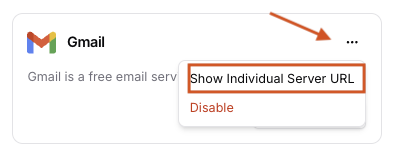
3
Authenticate
Complete Auth by Click “Anthorize” button.
4
Use in your app
Add to your favorite MCP-supported clients, such as Cursor, Claude Code, VS Code, ChatGPT, etc.
1
Install the SDKs (optional)
pip install klavis
npm install klavis
2
Create a server instance
curl -X POST "https://api.klavis.ai/mcp-server/instance/create" \
  -H "Authorization: Bearer YOUR_KLAVIS_API_KEY" \
  -H "Content-Type: application/json" \
  -d '{
    "serverName": "Gmail",
    "userId": "user123"
  }'
from klavis import Klavis
from klavis.types import McpServerName

klavis_client = Klavis(api_key="YOUR_KLAVIS_API_KEY")

server = klavis_client.mcp_server.create_server_instance(
    server_name=McpServerName.GMAIL,
    user_id="user123",
)
print(server.server_url)
import { KlavisClient, Klavis } from 'klavis';

const klavisClient = new KlavisClient({ apiKey: 'YOUR_KLAVIS_API_KEY' });
const server = await klavisClient.mcpServer.createServerInstance({
  serverName: Klavis.McpServerName.Gmail,
  userId: 'user123',
});
console.log(server.serverUrl);
Response Information: The API returns:
serverUrl: The URL you’ll use to connect your MCP client to the individual MCP ServeroauthUrl: Authorization link if the service requires OAuth authentication
API Reference
Full Individual MCP Server endpoints
3
Authenticate
Copy and paste the OAuth URL into your web browser
import webbrowser
if getattr(server, 'oauth_url', None):
    webbrowser.open(server.oauth_url)
if (server.oauthUrl) {
  window?.open?.(server.oauthUrl);
}
Authentication Methods:
- API Key: See API Key authentication guide for details.
- OAuth: See OAuth authentication guide for details.
🎉 Your MCP Server URL is ready to use! Once authentication is complete, you can use your MCP server URL with any MCP-compatible client.
4
(optional) Connect to your AI application
- LangChain
- LlamaIndex
- CrewAI
- AutoGen
import os
import asyncio
import webbrowser

from klavis import Klavis
from klavis.types import McpServerName
from langchain_openai import ChatOpenAI
from langchain_mcp_adapters.client import MultiServerMCPClient
from langgraph.prebuilt import create_react_agent

from dotenv import load_dotenv
load_dotenv()

async def main() -> None:
    klavis_client = Klavis(api_key=os.getenv("KLAVIS_API_KEY"))

    # Step 1: Create a single MCP server (e.g., Gmail)
    response = klavis_client.mcp_server.create_server_instance(
        server_name=McpServerName.GMAIL,
        user_id="demo_user",
    )

    # Step 2: Handle OAuth authorization if needed
    if hasattr(response, 'oauth_url') and response.oauth_url:
        webbrowser.open(response.oauth_url)
        input("Press Enter after completing OAuth authorization...")

    # Step 3: Create LangChain Agent with MCP Tools
    mcp_client = MultiServerMCPClient({
        "gmail": {
            "transport": "streamable_http",
            "url": response.server_url,
        }
    })

    # Get all available tools from the server
    tools = await mcp_client.get_tools()
    # Setup LLM
    llm = ChatOpenAI(model="gpt-4o-mini", api_key=os.getenv("OPENAI_API_KEY"))

    # Step 4: Create LangChain agent with MCP tools
    agent = create_react_agent(
        model=llm,
        tools=tools,
        prompt=(
            "You are a helpful assistant that can use MCP tools. "
        ),
    )

    # Step 5: Invoke the agent
    result = await agent.ainvoke({
        "messages": [{"role": "user", "content": "Search my inbox for unread emails and summarize."}],
    })

    # Print only the final AI response content
    print(result["messages"][-1].content)

if __name__ == "__main__":
    asyncio.run(main())
import os
import asyncio
import webbrowser

from klavis import Klavis
from klavis.types import McpServerName
from llama_index.llms.openai import OpenAI
from llama_index.core.agent.workflow import FunctionAgent
from llama_index.tools.mcp import BasicMCPClient
from llama_index.tools.mcp import (
    aget_tools_from_mcp_url,
)

from dotenv import load_dotenv
load_dotenv()

async def main() -> None:
    klavis_client = Klavis(api_key=os.getenv("KLAVIS_API_KEY"))

    # Step 1: Create a single MCP server (e.g., Gmail)
    response = klavis_client.mcp_server.create_server_instance(
        server_name=McpServerName.GMAIL,
        user_id="demo_user",
    )

    # Step 2: Handle OAuth authorization if needed
    if hasattr(response, 'oauth_url') and response.oauth_url:
        webbrowser.open(response.oauth_url)
        input("Press Enter after completing OAuth authorization...")

    # Step 3: Create LlamaIndex Agent with MCP Tools
    tools = await aget_tools_from_mcp_url(
        response.server_url,
        client=BasicMCPClient(response.server_url)
    )

    # Setup LLM
    llm = OpenAI(model="gpt-4o-mini", api_key=os.getenv("OPENAI_API_KEY"))

    # Step 4: Create LlamaIndex agent with MCP tools
    agent = FunctionAgent(
        name="gmail_agent",
        description="Agent using Gmail MCP tools",
        tools=tools,
        llm=llm,
        system_prompt=(
            "You are a helpful assistant that can use MCP tools. "
        ),
    )

    # Step 5: Invoke the agent
    result = await agent.run(
        "Search my inbox for unread emails and summarize."
    )

    # Print the response
    print(result)

if _name_ == "_main_":
    asyncio.run(main())
Coming soon
import os
import asyncio
import webbrowser

from dotenv import load_dotenv
from klavis import Klavis
from klavis.types import McpServerName
from autogen_agentchat.agents import AssistantAgent
from autogen_agentchat.ui import Console
from autogen_core import CancellationToken
from autogen_ext.models.openai import OpenAIChatCompletionClient
from autogen_ext.tools.mcp import StreamableHttpMcpToolAdapter, StreamableHttpServerParams
from autogen_ext.tools.mcp import mcp_server_tools


load_dotenv()

async def main() -> None:
    klavis_client = Klavis(api_key=os.getenv("KLAVIS_API_KEY"))

    # Create MCP server instance
    response = klavis_client.mcp_server.create_server_instance(
        server_name=McpServerName.GMAIL,
        user_id="demo_user",
    )

    # Handle OAuth authorization if required
    if getattr(response, "oauth_url", None):
        webbrowser.open(response.oauth_url)
        input("Press Enter after completing OAuth authorization...")

    server_params = StreamableHttpServerParams(
        url=response.server_url,
        timeout=30.0,
        sse_read_timeout=300.0,
        terminate_on_close=True,
    )

    adapters = await mcp_server_tools(server_params)

    model_client = OpenAIChatCompletionClient(model="gpt-4")
    agent = AssistantAgent(
        name="MailAI",
        model_client=model_client,
        tools=adapters,
        system_message="You are a helpful Gmail assistant.",
    )

    await Console(
        agent.run_stream(
            task="Find My Latest Emails",
            cancellation_token=CancellationToken()
        )
    )

if __name__ == "__main__":
    asyncio.run(main())
Visit https://github.com/Klavis-AI/klavis/mcp_servers to view the source code and find more information
1
Run the server locally or in your infra
docker run -p 5000:5000 ghcr.io/klavis-ai/gmail-mcp-server:latest
Browse all available MCP server Docker images at GitHub Packages
2
Point your MCP client to the URL
Use the local URL (for example, http://localhost:5000) in your client or aggregator.
3
Secure and deploy
Add TLS, auth, and deploy behind your gateway as needed.
For the recommended approach with better tool management and progressive discovery, see Strata MCP Server.